Using HTML5 semantic tags is a very important part of web development today. back then, the internet people used messy tables to build their layouts, which could have been very confusing. After that, we moved into an era where everything was just a <div>. While a <div> works as a container to hold things, it is generic and doesn’t actually explain what is inside of it, unless you use long ID names. Now we have semantic HTML, and it is all about giving your code real meaning. This means it is essential for things like Accessibility and SEO if you want your site to be professional and easy to use.
What is a semantic tag in HTML?
In simple terms, semantics is giving tags a meaning, In web design, this refers to using tags that tell the browser and the developer exactly what the content is. For example, a <div> or a <span> is not a semantic tag because they don’t give any information about what they contain. However, tags like <header>, <nav>, and <footer> are semantic because they clearly define their meaning to the computer. It is a bit like the difference between handing someone a pile of random papers and handing them a book that has a clear table of contents, chapters, and an index.
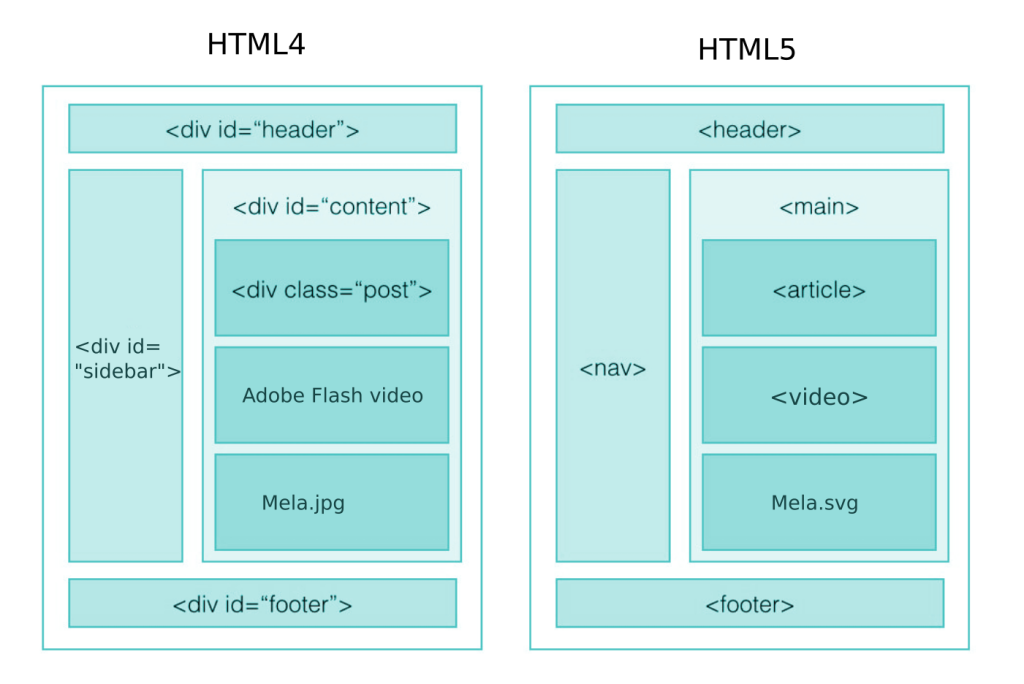
Helping with accessibility
Firstly, semantic tags acts like a map for people who use assistive technology such as screen readers. For people who can see the screen, identifying a sidebar or a navbar is easy because of where it is placed on the page. But for someone using a screen reader, viewing it doesn’t exist. They mostly rely on the code to understand the layout and find what they need.
When you use tags like <main>, <nav>, and <aside>, the browser automatically creates landmarks. This is very helpful because it allows screen reader users to use the keyboard to jump straight to the parts they want to read. Without these tags, a user might have to listen to your entire navigation menu with 50 different links every single time they click on a new page just to get to the actual content they were looking for. This leads to a negative experience and disengagement on your website. Using these tags makes the experience much better and prevents people from getting frustrated.
Improving your SEO
Secondly, search engines like Google act like blind users because they only see your code, not your CSS or cool pictures. Using the right tags helps their “crawlers” understand what parts of your website are the most important.
Google uses your tags to build an information hierarchy. For instance, keywords that are placed inside an <article> tag are indexed as primary content, while things inside a <footer> are treated as secondary info. Also, nesting your <h1> through <h6> tags properly tells the bot exactly how your topics are categorized. While using semantic HTML aren’t magic tools that automatically puts you at the #1 spot on Google, it provides the clarity that search engines reward with better scores.

Avoiding too many Div’s and cleaner code
If your code looks like a giant stack of <div> tags inside other <div> tags, you use too many divs. This makes your code very hard to read for humans. When you come back to a project months later, seeing <section id=”features”> is way more helpful than seeing <div class=”container-inner-2″>. It makes it much easier to fix bugs or work with a team.
There is also a performance benefit, browsers can parse semantic HTML a bit more efficiently. While the speed gain for one tag is tiny, having the correct structure makes the whole site feel faster. This contributes to better site vitals, which is another big win for your site’s SEO rankings.
Key tags you should use
If you want to improve your website, you should focus on using these specific tags:
- <main>: This is for the unique, primary content of the page. You should only have one per page.
- <nav>: This is used for your navigation bar.
- <article>: Use this for content that stands on its own, like a blog post or a news story.
- <section>: This is for grouping related content together, usually with its own heading.
- <aside>: This is for extra info like sidebars.
In conclusion
It is crucial to use semantic tags instead of just generic containers. It helps users with disabilities and keeps your code clean. The web is meant to be read by everyone, both humans and machines, spending those extra few seconds to choose an <article> over a <div> is making your website much more professional. I think if you design with using sematic elements when needed, your website will be much more successful and reach a lot more people.